
Best Free AI Tools for Beginners in 2026

Discover the most useful free AI tools that can transform your daily work and creativity
Introduction
Are you curious about Artificial Intelligence but feel overwhelmed by complex tools and technical jargon? You’re not alone! Many beginners want to explore AI but don’t know where to start or worry about expensive subscriptions. The good news is that 2026 brings amazing free AI tools that anyone can use – no technical background needed!
Artificial Intelligence is no longer just for tech experts. Today, there are powerful AI tools available for free that can help you write better, create stunning designs, generate images, make videos, and learn new skills. Whether you’re a student, small business owner, content creator, or just someone curious about technology, these tools can save you time and boost your creativity.
In this beginner-friendly guide, we’ll explore the best free AI tools of 2026. We’ll break them down into simple categories, explain exactly what each tool does, and show you how to get started. By the end of this article, you’ll have a toolkit of free AI resources that can help you in your daily tasks and projects. Let’s dive in!
What Are AI Tools and Why Should Beginners Use Them?
AI tools are software applications that use Artificial Intelligence to help you perform tasks more efficiently. Think of them as smart assistants that can understand what you need and help you achieve it faster. Here’s why beginners should consider using them:
- No Technical Skills Required: Most modern AI tools are designed with beginners in mind. You don’t need to be a programmer or tech expert to use them effectively.
- Free to Start: Many top AI companies offer free versions of their tools to help beginners learn and explore without financial pressure.
- Time-Saving Magic: What might take hours manually can often be done in minutes with AI assistance.
- Learning Opportunity: Using these tools helps you understand AI concepts practically, preparing you for future technological changes.
- Level Playing Field: AI tools give beginners access to capabilities that were once only available to professionals with expensive software.
Writing and Productivity AI Tools
ChatGPT
Best For: General writing, learning, brainstorming, and problem-solving
ChatGPT remains one of the most versatile free AI tools in 2026. It’s like having a helpful assistant that can answer questions, help with writing, and generate ideas.
Free Features Available:
- Unlimited text conversations (with some limitations)
- Help with writing emails, essays, and creative content
- Explanation of complex topics in simple language
- Brainstorming and idea generation
- Basic code writing and debugging help
How Beginners Can Use It:
- Learning Assistant: Ask it to explain any topic as if you’re a beginner
- Writing Helper: Get help starting that blog post or email you’ve been putting off
- Idea Generator: Stuck for content ideas? ChatGPT can suggest dozens
- Study Partner: Use it to quiz you on topics you’re learning
Pro Tip: Be specific in your requests. Instead of “write about climate change,” try “explain climate change to a 10-year-old in three paragraphs.”
Grammarly AI
Best For: Improving writing quality, grammar checking, and tone adjustment
Grammarly has evolved from a simple grammar checker to a comprehensive AI writing assistant that’s perfect for beginners.
Free Features Available:
- Basic grammar and spelling corrections
- Tone suggestions for emails and messages
- Clarity improvements
- Plagiarism checker (limited checks per month)
- Basic rewriting suggestions
How Beginners Can Use It:
- Email Perfection: Write professional emails with confidence
- Social Media Polish: Make your posts clear and engaging
- Learning English: Improve your grammar naturally as you write
- Academic Writing: Ensure your essays and papers are error-free
Best Feature: The browser extension works everywhere you write online – from social media to email to document editors.
Design and Creativity AI Tools

Canva AI
Best For: Graphic design, social media posts, presentations, and marketing materials
Canva has integrated AI features that make professional design accessible to everyone, even complete beginners.
Free AI Features:
- Magic Design: Describe what you want, and AI creates design options
- Text-to-Image: Generate images from text descriptions
- Background Remover: Remove backgrounds from images (limited uses)
- Magic Write: AI writing assistant within Canva
- Design Suggestions: AI recommends improvements to your designs
How Beginners Can Use It:
- Social Media Graphics: Create eye-catching posts for Instagram, Facebook, or Twitter
- Presentations: Design professional slides without design skills
- Marketing Materials: Make flyers, brochures, and business cards
- Personal Projects: Design invitations, greeting cards, or photo collages
Beginner Tip: Start with templates and use AI to customize them to your needs.
Microsoft Designer
Best For: Quick designs, AI-generated visuals, and social media content
Microsoft’s entry into AI design tools offers a surprisingly capable free tier that integrates well with other Microsoft products.
Free Features:
- AI-powered design generation from text prompts
- Social media post templates
- Basic editing tools
- Integration with Microsoft 365 (if you have it)
- Export in multiple formats
Perfect For: Beginners who want simple, quick designs without learning complex software.
Image Generation AI Tools

Create stunning visuals with AI image generators – no art skills needed
Bing Image Creator
Best For: Free AI art generation with simple prompts
Powered by DALL-E technology, Bing Image Creator offers one of the most accessible ways to generate AI images for free.
Free Features:
- Generate multiple images from text descriptions
- Daily free credits (enough for regular use)
- Integration with Bing search
- Simple, beginner-friendly interface
- No sign-up required for basic use
How Beginners Can Use It:
- Blog Illustrations: Create unique images for your articles
- Social Media Content: Generate eye-catching visuals
- Creative Projects: Bring your imagination to life
- Learning Tool: Experiment with different art styles
Prompt Tip: Be descriptive. Instead of “a dog,” try “a fluffy golden retriever puppy playing in a sunny meadow, digital art style.”
Leonardo AI
Best For: More advanced AI art with daily free credits
While Leonardo AI offers premium features, its free tier is generous enough for beginners to explore AI art generation.
Free Features:
- 150 free tokens daily (resets every day)
- Access to multiple AI models
- Basic image editing capabilities
- Community models and styles
- Training resources for beginners
Great For: Beginners who want to experiment with different art styles and techniques beyond basic image generation.
Video AI Tools
CapCut AI
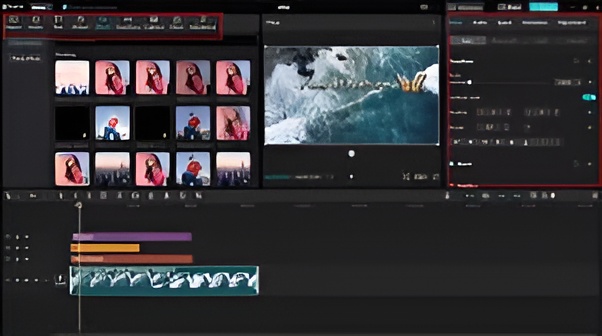
Best For: Video editing, auto-captions, and social media videos
CapCut’s AI features make video creation accessible to complete beginners who might find traditional video editing overwhelming.
Free AI Features:
- Auto Captions: Automatically generate and sync captions
- Text-to-Video: Create videos from text scripts
- AI Music Generator: Create background music for your videos
- Template Library: AI-suggested templates based on your content
- Background Removal: For video clips (limited in free version)
How Beginners Can Use It:
- Social Media Videos: Create engaging TikTok, Instagram, or YouTube shorts
- Presentation Videos: Turn your ideas into visual stories
- Family Videos: Edit holiday or event videos easily
- Educational Content: Create simple explainer videos
Best For: Complete beginners in video editing who want quick, professional results.
Pictory AI (Free Trial)
Best For: Turning blog posts into videos and creating video summaries
While Pictory is primarily a paid tool, it offers a generous free trial that’s perfect for beginners to test the waters of AI video creation.
Free Trial Features:
- Create 3 video projects for free
- Turn articles/blog posts into videos
- Auto-summarize long videos
- Access to stock media library
- Basic text-to-video functionality
Perfect For: Bloggers and content creators who want to repurpose written content into engaging videos.
Learning and Research AI Tools
Google Gemini
Best For: Research, learning, and alternative AI conversations
Google’s AI assistant offers a robust free tier that’s particularly good for research and fact-based queries.
Free Features:
- Conversational AI similar to ChatGPT
- Integration with Google search for current information
- Ability to handle longer conversations
- File upload support (images, PDFs, etc.)
- Cross-platform availability
How Beginners Can Use It:
- Research Assistant: Get help with school or work research
- Learning Companion: Ask questions about any topic
- Writing Helper: Alternative perspective to ChatGPT
- Document Analysis: Upload and ask questions about your documents
Special Feature: Better integration with current events and recent information compared to some other AI tools.
Notion AI (Limited Free)
Best For: Note-taking, organization, and content planning
Notion’s AI features enhance its already powerful organizational capabilities, though the AI features have usage limits in the free plan.
Free AI Features:
- AI writing assistance within notes
- Summarization of long documents
- Translation between languages
- Basic content generation
- Task and project planning help
How Beginners Can Use It:
- Study Notes: Summarize textbook chapters or lectures
- Content Planning: Organize and plan your blog or social media content
- Project Management: Keep track of personal or small business projects
- Knowledge Base: Create your personal Wikipedia for topics you’re learning
Best Approach: Use Notion AI to enhance your existing organizational system rather than starting from scratch.
How to Choose the Right AI Tool for Your Needs
With so many options available, how do you pick the right tool? Here’s a simple decision guide for beginners:
For Writing and Content Creation:
- Start with: ChatGPT for general writing help
- Add: Grammarly for polishing and grammar checking
- Advanced: Notion AI for organized content planning
For Design and Graphics:
- Beginner choice: Canva AI for its all-in-one capabilities
- Quick designs: Microsoft Designer for speed
- Social media focus: Both work well!
For Image Creation:
- First try: Bing Image Creator for simplicity
- More control: Leonardo AI for artistic exploration
- Remember: Both offer free options to start
For Video Creation:
- Editing focus: CapCut AI for full video editing
- Content repurposing: Pictory AI for turning text into video
- Beginner tip: Start with one tool and master it before adding another
For Learning and Research:
- General questions: Google Gemini for up-to-date information
- Structured learning: Notion AI for organizing knowledge
- Best practice: Try different tools for different types of questions
Beginner’s Golden Rule: Start with ONE tool from each category that interests you. Master it before adding more tools to avoid overwhelm.
Common Mistakes Beginners Make with AI Tools (And How to Avoid Them)
Mistake 1: Expecting perfection on the first try
Solution: AI tools often need refinement. Treat initial outputs as drafts to improve.
Mistake 2: Using vague prompts
Solution: Be specific. Instead of “write a blog post,” try “write a 300-word introduction to gardening for complete beginners in friendly tone.”
Mistake 3: Ignoring ethical guidelines
Solution: Always disclose AI assistance when required, don’t plagiarize, and respect copyrights.
Mistake 4: Over-relying on AI
Solution: Use AI as an assistant, not a replacement for your own thinking and creativity.
Mistake 5: Not exploring free features fully
Solution: Before considering paid plans, make sure you’ve maximized what’s available for free.
Future of Free AI Tools – 2026 Trends
What can beginners expect as we move through 2026?
- More Integration: AI tools will work together more seamlessly
Mobile-First Design: Better AI experiences on smartphones
Specialized Tools: More niche AI tools for specific tasks
Better Free Tiers: Competition will drive companies to offer more in free versions
Educational Focus: More tools designed specifically for learning and skill development
Beginner Advantage: The tools are becoming easier to use just as you’re starting your AI journey!
Conclusion
Starting your AI journey in 2026 has never been easier or more accessible. With these free tools, you can explore Artificial Intelligence without financial risk or technical overwhelm. Remember that every expert was once a beginner, and these tools are designed to help you learn and grow at your own pace.
Our Top 3 Recommendations for Complete Beginners:
Our Top 3 Recommendations for Complete Beginners:
- ChatGPT – Your all-purpose AI assistant
- Canva AI – For all your design needs
- Bing Image Creator – To explore AI art generation
The best way to learn is by doing. Pick one tool that interests you most and start experimenting today. You’ll be surprised how quickly you can create, learn, and accomplish with AI assistance.
Final Encouragement: Don’t wait for the “perfect” time to start. The world of AI is moving fast, and beginning your journey now puts you ahead of the curve. These free tools lower all barriers to entry – all you need is curiosity and willingness to try.
Ready to explore more tech topics? Check out our other beginner guides on [baqirdigitalhub.com] for simple explanations of today’s most important technologies. Remember, in the world of AI, the best time to start was yesterday – the second-best time is right now!
Ready to explore more tech topics? More beginner guides are coming soon on our blog
In the world of AI, the best time to start is right now!
If you’re upgrading your tech setup, don’t miss our list of the Best Budget Smartphones in 2026.

Baqir Ali is the Founder of Baqir Digital Hub and a passionate SEO, AI, and Blogging specialist. With years of experience in digital marketing, he helps beginners and professionals grow online using smart content strategies, AI tools, and SEO best practices. His mission is to simplify technology and help people build sustainable online income.
Pingback: Best Budget Smartphones in 2026 (Top 7 Picks for Performance & Value) - Baqir Digital Hub